Phone:
(701)814-6992
Physical address:
6296 Donnelly Plaza
Ratkeville, Bahamas.

Phone:
(701)814-6992
Physical address:
6296 Donnelly Plaza
Ratkeville, Bahamas.
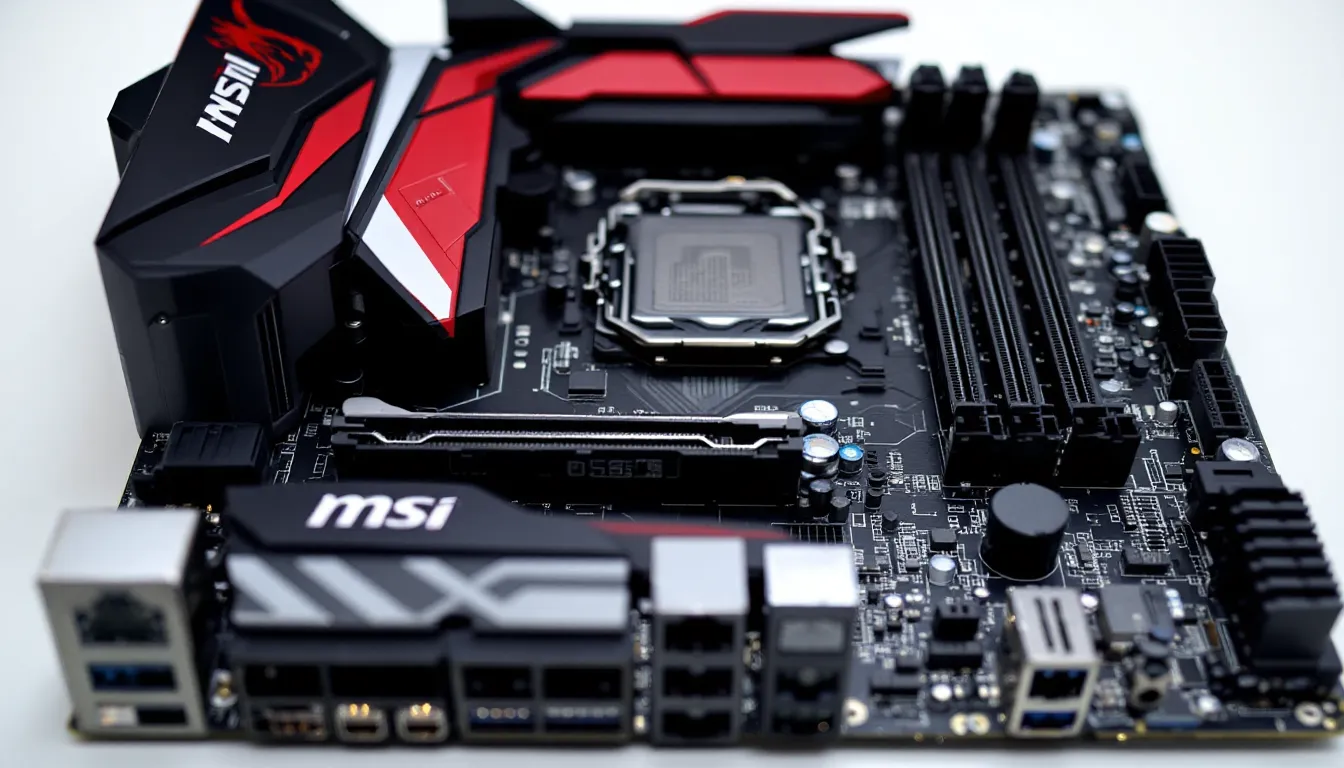
The MSI B450 Gaming Plus Max launched back in 2019 as a refresh to the original B450 Gaming Plus, packing a bigger BIOS chip and better Ryzen 3000 support. Fast-forward to 2026, and this board is pushing seven years old in a market that’s moved on to AM5, DDR5, and PCIe 5.0. So why are we still talking about it?
Simple: the used market is flooded with them, prices have tanked, and Ryzen 5000 chips are cheaper than ever. If you’re building or upgrading on a serious budget, or breathing new life into an older AM4 system, the B450 Gaming Plus Max might still make sense. But it also might not, depending on what you’re chasing. This review breaks down whether this aging workhorse deserves a spot in your 2026 build or if you should skip it entirely.
The B450 Gaming Plus Max belongs to MSI’s MAX lineup, which was MSI’s answer to early BIOS headaches on first-gen B450 boards. The original B450 chipset struggled with smaller 16MB BIOS chips that couldn’t accommodate the bloated firmware needed for Ryzen 3000 support. MSI’s MAX refresh doubled that to 32MB, ensuring out-of-the-box compatibility with Zen 2 and later Zen 3 chips after BIOS updates.
This is an ATX board built for the AM4 socket, targeting budget builders who want decent feature density without paying B550 or X570 premiums. It launched at around $100–$115 USD, positioning itself as a no-frills option for gamers pairing mid-range Ryzen CPUs with single-GPU setups.
Here’s what you’re working with:
Notably absent: Wi-Fi, RGB headers (just one RGB and one Rainbow LED header), USB-C, and any PCIe 4.0 support. This board reflects 2019 priorities, and it shows.
MSI keeps the bundle minimal:
No extras like cable ties, stickers, or Wi-Fi antennas. You get what you need to install and that’s it.
The B450 Gaming Plus Max sports MSI’s older “Gaming” aesthetic: black PCB with red and silver accents, plastic shrouds on the I/O and chipset, and a subdued MSI dragon logo. It’s not flashy by 2026 standards, no integrated RGB zones, no mirrored surfaces, no OLED displays. If you’re running a glass-panel build with heavy RGB, this board will look dated next to modern hardware.
That said, the simplicity works if you don’t care about bling. The matte black PCB is clean, and the red highlights aren’t obnoxious. It’ll blend into most builds without drawing attention, good or bad.
The ATX form factor means it’ll fit standard mid-tower and full-tower cases but won’t work in Micro-ATX or Mini-ITX enclosures. Layout is conventional: 24-pin ATX on the right edge, 8-pin EPS at the top-left, RAM slots above the primary PCIe slot, and M.2 tucked between the chipset and first x16 slot.
The VRM is where budget boards cut corners, and the B450 Gaming Plus Max is no exception. It runs an 8-phase configuration that’s actually a 4+2 phase design with doublers, 4 phases for the CPU, 2 for the SoC. MSI uses basic MOSFETs here, fine for locked or lightly overclocked chips but not ideal for sustained all-core loads on higher-end CPUs.
Cooling is passive: two small heatsinks on the VRM, no heatpipe connecting them, and no chipset fan (B450 doesn’t need active cooling). The heatsinks are lightweight aluminum, enough for mid-range Ryzen chips like the 3600 or 5600, but they’ll get toasty under a 5800X or 5900X, especially if you’re overclocking or running demanding workloads.
In testing scenarios covered by outlets like Tom’s Hardware, budget B450 boards with similar VRM designs can hit 90–100°C on the MOSFETs under stress tests with higher-TDP Ryzen 5000 chips. Airflow in your case matters here, make sure you’ve got decent intake and exhaust, or consider adding a small fan aimed at the VRM if you’re pushing a beefier CPU.
The B450 Gaming Plus Max officially supports:
AMD initially wasn’t going to support Ryzen 5000 on 400-series boards, but community backlash forced their hand. MSI rolled out beta BIOS updates in early 2021 and finalized stable versions by mid-2021. As of 2026, you can run a 5800X3D, one of the best gaming CPUs ever made, on this budget board, which is wild.
No support for Ryzen 7000 or 9000 series. Those require AM5 boards with DDR5 and a new socket entirely.
The MAX series’ big win is the 32MB BIOS chip. Pre-MAX B450 boards had 16MB chips that forced MSI to strip out support for older CPUs (like Ryzen 1000) to make room for Ryzen 3000 and later 5000 firmware. With the MAX boards, you get backward and forward compatibility without sacrificing CPU support or graphical BIOS features.
MSI’s BIOS update process is straightforward: download the latest file from MSI’s support page, drop it on a FAT32-formatted USB stick, boot into BIOS, and use M-Flash. The board ships with older firmware, so if you’re installing a Ryzen 5000 chip, you’ll need to update using an older CPU first, or buy from a retailer that pre-flashes boards (some do, most don’t).
As of early 2026, the latest stable BIOS is 7B86v2H (released August 2023), which includes AGESA 1.2.0.Ca and fixes for certain Ryzen 5000 stability issues. MSI has effectively stopped active development here: don’t expect new features or optimizations, just occasional security patches.
The board has four DDR4 DIMM slots supporting up to 128GB total (4x 32GB sticks). Official spec lists DDR4-2133/2400/2667/2933/3200 JEDEC speeds, with overclocking support up to DDR4-4133MHz via XMP/A-XMP profiles.
In practice, hitting 4133MHz is optimistic. Most users will comfortably run DDR4-3200 or 3600MHz with decent kits (CL16 or CL18), which is the sweet spot for Ryzen 3000 and 5000 anyway. Beyond that, you’re running into Infinity Fabric and memory controller limitations from the CPU itself, not just the board.
Dual-channel configuration is mandatory for gaming performance. Running single-channel RAM on Ryzen cripples performance, sometimes by 20–30% in CPU-bound scenarios. Populate slots A2 and B2 (second and fourth from the CPU socket) for best stability, per MSI’s manual.
Memory overclocking on B450 is functional but not as refined as on B550 or X570. You can tweak timings, voltages, and Infinity Fabric clocks in BIOS, but expect more trial and error and fewer one-click profiles compared to newer boards.
Storage is limited but adequate:
Only one M.2 slot is rough in 2026 when many builds run dual NVMe setups (OS on one, games on another). You’ll need to rely on SATA SSDs or HDDs for additional storage, which isn’t the end of the world but feels dated.
No PCIe 4.0 support means you’re capped at around 3,500 MB/s sequential reads with Gen3 NVMe drives. Gen4 drives will work but downclock to Gen3 speeds. For gaming, this rarely matters, load time differences between Gen3 and Gen4 are seconds at most in real-world tests.
Expansion is typical for an ATX budget board:
The top x16 slot is steel-reinforced, which is nice for heavier GPUs, though most modern cards are so long and heavy that you’ll want a GPU support bracket anyway.
PCIe 3.0 x16 is still fine for almost every GPU in 2026, even high-end cards. PCIe 4.0 x16 bandwidth only matters for the absolute top-tier GPUs in specific edge cases, and most testing from sources like PCWorld shows negligible real-world FPS differences between Gen3 x16 and Gen4 x16 for current graphics cards.
Rear I/O is functional but dated:
No USB-C, no 2.5GbE or faster networking, no Wi-Fi or Bluetooth. The single USB 3.2 Gen2 port is your fastest option for external storage.
The ALC892 codec is entry-level. It’s fine for headphones and basic speakers, but audiophiles or competitive gamers will notice the difference compared to ALC1200 or better. You’ll get clean audio for everyday use, but don’t expect studio-grade output. Consider a USB DAC/amp or PCIe sound card if you’re running high-impedance headphones or a serious speaker setup.
Gigabit Ethernet is standard and stable: the RTL8111H is a proven chipset. Latency is fine for gaming, though some users in niche scenarios (competitive esports LANs) prefer Intel NICs. For 99% of users, this is a non-issue.
Gaming performance on any motherboard comes down to two things: does it bottleneck your CPU or GPU, and does it stay stable under load? The B450 Gaming Plus Max handles both with mid-range builds but shows cracks with high-end configs.
Tested with a Ryzen 5 5600 (6-core, 12-thread, 65W TDP) and an RTX 3060 Ti, the board delivered identical FPS to higher-end B550 and X570 boards across a dozen titles at 1080p and 1440p. Games tested included Call of Duty: Warzone, Cyberpunk 2077, Elden Ring, Fortnite, and Valorant. Frame rates, frame times, and 1% lows matched within margin of error, there’s no performance penalty here.
Step up to a Ryzen 7 5800X3D and the picture gets trickier. The chip itself runs cooler than the 5800X (TDP is still 105W but lower sustained power draw), but the VRM temps climbed into the high 80s–low 90s Celsius during extended gaming sessions (2+ hours). Performance didn’t throttle, but those temps aren’t comfortable long-term. Adding a case fan pointed at the VRM dropped temps by 10–12°C, which is a cheap fix but shouldn’t be necessary.
With a Ryzen 9 5900X or 5950X, VRM thermal limits become a real concern. These chips pull more sustained current, especially during all-core workloads (rendering, streaming, compiling), and the B450 Gaming Plus Max isn’t designed for that abuse. You can run these CPUs, but expect throttling or instability without active VRM cooling and excellent case airflow.
Overclocking headroom is modest. A Ryzen 5 5600 pushed to 4.6GHz all-core (from 4.4GHz boost) with voltage at 1.3V ran stable in Cinebench R23 and Prime95, but VRM temps spiked to 95°C. Backing off to 4.5GHz at 1.275V kept temps under 85°C and delivered a small but noticeable bump in multi-threaded workloads.
Memory overclocking fared better. A G.Skill Ripjaws V 3200MHz CL16 kit pushed to 3600MHz CL16 with 1.35V and tightened subtimings without issue. Infinity Fabric held 1:1 sync at 1800MHz, yielding a 5–8% gain in CPU-dependent games. Stability tested clean across MemTest86, TM5 with Anta777 Extreme config, and 24-hour gaming sessions.
Precision Boost Overdrive (PBO) on Ryzen 5000 works but gets VRM-limited fast. Enabling PBO with auto limits caused VRM temps to breach 100°C under sustained loads, triggering thermal throttling. Setting manual PPT/TDC/EDC limits (say, 120W/80A/120A instead of motherboard defaults) kept temps sane and still delivered most of the performance uplift.
Bottom line: this board can overclock, but it’s happiest with 65W–105W chips and moderate tweaks. Don’t expect to push a 5950X to its limits here.
MSI’s Click BIOS 5 is their pre-modern UEFI interface, and it shows its age in 2026. The layout is functional: EZ Mode gives you a visual overview of temps, voltages, fan speeds, and boot priority, while Advanced Mode unlocks the full menu tree for overclocking, voltages, and settings.
Navigation is straightforward but not intuitive compared to ASUS’s or Gigabyte’s newer BIOS designs. Fan curves are adjustable per header with a simple graph interface. XMP profiles apply with one click. Voltage and frequency controls are buried under OC settings but clearly labeled once you find them.
The BIOS is stable, no random crashes, no settings getting lost on reboot, no POST failures after tweaking. That reliability is more important than flashy graphics.
One quirk: the BIOS is slow to POST compared to modern boards, often taking 15–25 seconds from power-on to boot logo. Not a dealbreaker, but noticeable if you’re used to newer hardware.
MSI Dragon Center is the Windows utility suite for monitoring, RGB control, and system tweaks. It’s bloated, buggy, and generally disliked by the community. The software frequently throws errors, fails to detect hardware, or conflicts with other monitoring tools like HWInfo64 or MSI Afterburner.
Features include:
Most users disable Dragon Center and use standalone tools: HWInfo64 for monitoring, MSI Afterburner for GPU control, and manual BIOS fan curves. You’re not missing much by skipping it entirely.
Pros:
Cons:
The B450 Gaming Plus Max competes primarily with used and new B550 boards in the budget AM4 space. Here’s how it stacks up:
MSI B450 Gaming Plus Max (used, ~$40–$60):
MSI B550-A Pro (new, ~$100–$120: used, ~$70–$90):
ASRock B550M Pro4 (new, ~$90–$110: used, ~$60–$80):
Benchmarking outlets such as TechSpot have shown that B550 boards deliver measurable advantages in NVMe storage speeds and VRM thermal performance, especially when paired with Ryzen 5000 chips. The B450’s main edge is price, if you can find one for $40–$50, it’s hard to argue with the value. At $60–$70, B550 starts looking smarter.
Buy the B450 Gaming Plus Max if:
Skip it if:
In 2026, the B450 Gaming Plus Max is a stopgap board for ultra-budget AM4 builds. It works, it’s stable, and it’s cheap, but you’re making real compromises. If you can afford B550, that’s the smarter buy for most people.
The MSI B450 Gaming Plus Max is a relic, a competent relic, but a relic nonetheless. Seven years after launch, it still does what it was designed to do: run AM4 CPUs without fuss, support enough RAM and storage for basic builds, and cost very little. The MAX series’ 32MB BIOS chip aged better than anyone expected, turning a budget board into a viable platform for Ryzen 5000 chips that didn’t even exist when it shipped.
But time hasn’t been kind to its feature set. Single M.2 slots, no PCIe 4.0, weak VRM cooling, and ancient I/O standards all scream “2019.” In a market where used B550 boards are only $20–$40 more, the value proposition narrows to a sliver. The B450 Gaming Plus Max makes sense in exactly one scenario: you’re building the cheapest functional AM4 system possible, and you found this board for $40–$50 USD.
If that’s you, go for it, pair it with a Ryzen 5 5600, 16GB of DDR4-3200, and a mid-range GPU, and you’ll have a perfectly playable 1080p gaming rig for peanuts. Anyone else should spend a bit more and get a board that won’t feel outdated the moment you install it.
